
Chery SA
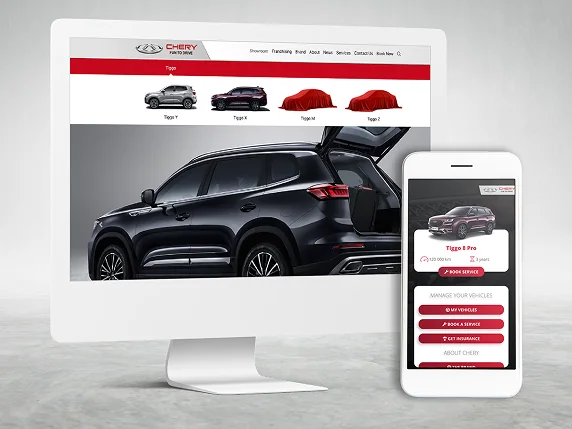
Mobile product discovery and vehicle ownership screens
Choosing a car and looking after one call for different information. The Chery SA gallery presents both: a model screen with test-drive and purchase actions, brand information, and vehicle cards alongside an ownership menu. We’ve highlighted the visible details below so you can use the presentation when discussing your own mobile automotive brief.
What you can inspect
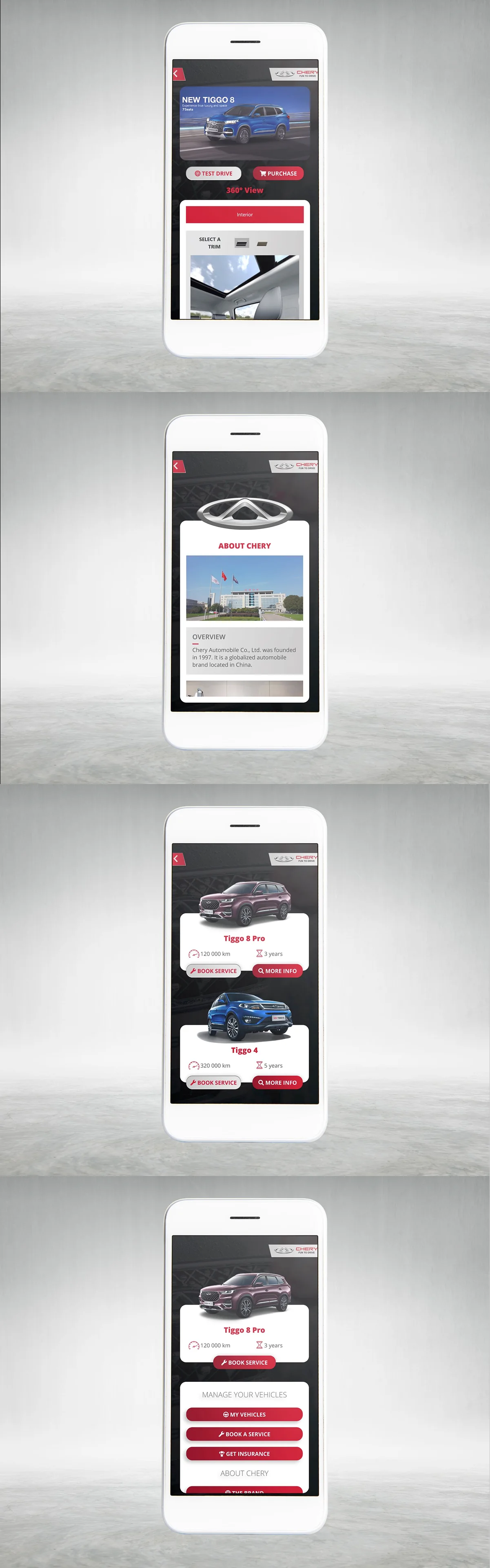
- The model screen leads with a large vehicle image. Test Drive and Purchase sit directly beneath it, followed by a 360° View label and an interior section with trim swatches. You can see how the screen places the next action close to the car being considered.
- The About Chery screen gives brand information its own space, using a logo, a building photograph and an overview panel.
- The vehicle list repeats a recognisable card layout: car image, model name, kilometre and year information, then Book Service and More Info actions. That repetition makes it easy to compare where the same details appear for each vehicle.
- The ownership screen places a vehicle card above a Manage Your Vehicles menu, with My Vehicles, Book a Service and Get Insurance grouped together. Red buttons and headings carry through the dark backgrounds and white content panels.
Open the original gallery below at full size to inspect the spacing and labels. These supplied screens show the presented interface; they do not confirm live booking or insurance connections, the production stack, authorship of every element or measured business results.
What this means for a similar project
For your brief, we’d start with the task a person brings to each screen. Someone browsing a model needs a clear way to ask about that car. An owner booking a service needs to know which vehicle the request concerns. The gallery is useful for discussing where those paths should meet and where each needs its own screen.
For example, if your application includes a Book Service button on every vehicle card, decide whether the selected vehicle carries into the request and what the person sees after submitting it. That is a question to resolve for your project, rather than a behaviour demonstrated by these still images. Bring your model list, the actions you want to offer and the information each request needs; we can use those to work through the screens with you.
Explore automotive websites and business systems or review website and service pricing. To discuss similar work, include this project link and the task you want your own customers or team to complete.
Chery SA
Project gallery.
Open a visual to explore it at full size. Use the arrow keys to move through the gallery and Escape to close.
Keep the right things connected.
Dealership Websites & Automotive Systems
Connect vehicle discovery, campaign landing pages and dealer enquiries with practical website, marketing and integration work for automotive businesses.
Service Pricing & Project Estimators
Choose a service estimator, explore scope and separate known costs from items that need a custom quote.
Dealership Websites & Automotive Systems
Connect vehicle discovery, campaign landing pages and dealer enquiries with practical website, marketing and integration work for automotive businesses.
Start a conversation
Tell us what you are working towards. We’ll help you find a practical next step.